> ## Documentation Index
> Fetch the complete documentation index at: https://docs.sg.tuitionable.com/llms.txt
> Use this file to discover all available pages before exploring further.
# Insights
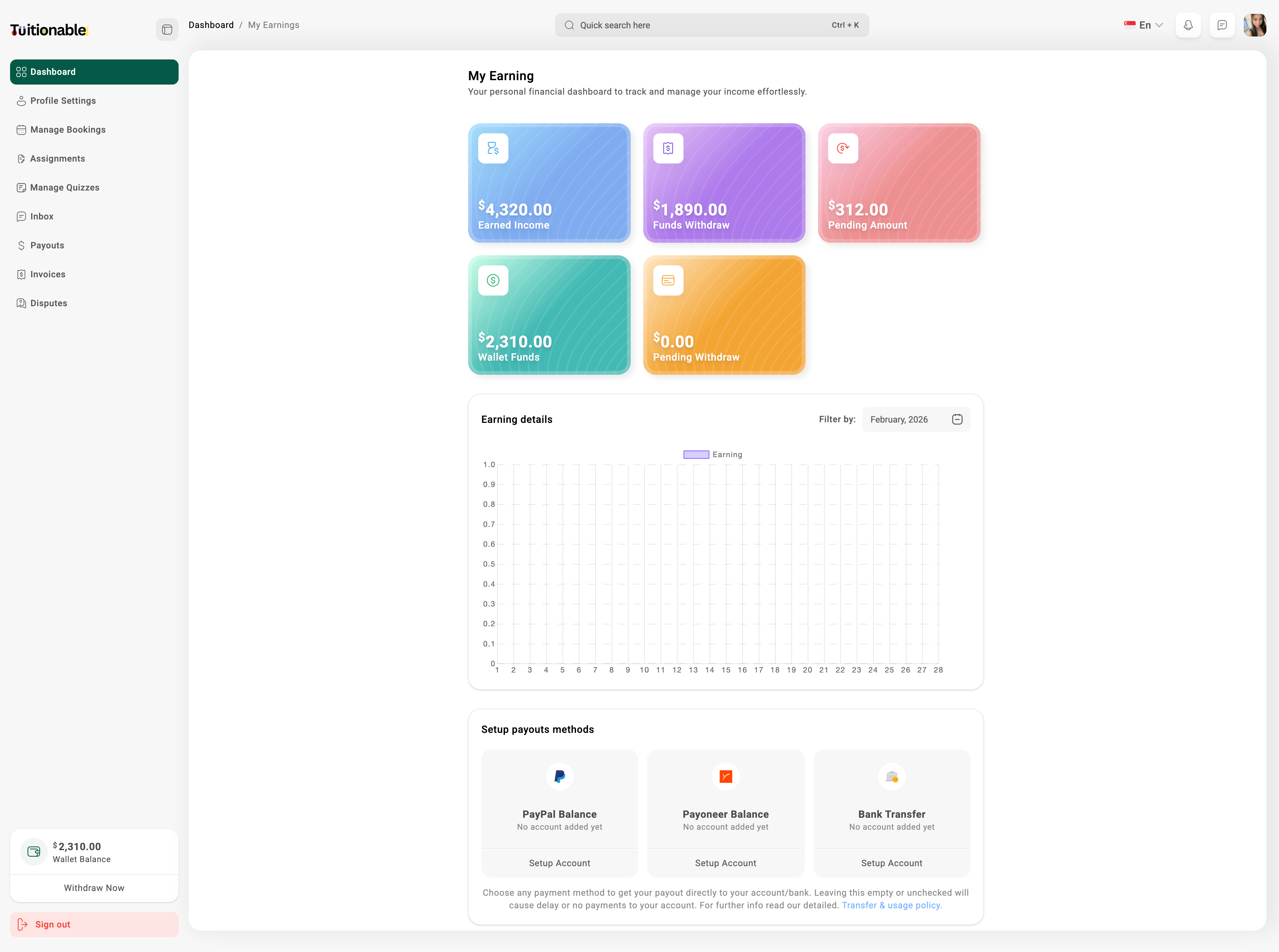
The **Insights** section provides a comprehensive overview of your financial performance, where you can manage payout settings and view an earnings graph.
### **Manage Payout Settings**
* Go to the **Insights** section from the main dashboard.
* Click on **Setup Payouts Methods**.
* Select your preferred payout method (e.g., PayPal, PayNow, or Bank Transfer).
* Click on **Setup Account** under the desired payment method and enter the required account details.
* Click **Save** to update your payout settings.
### **View Earnings Graph**
* In the **Insights** section, locate the **My Earnings** panel.
* Here, you can see your **Earned Income**, **Funds Withdrawn**, **Pending Amount**, and **Wallet Funds**.
* Below the panels, view the **Earnings Graph** which displays your earnings over a selected period.
* Use the **Filter by** option to select a specific month or custom date range to analyze your earnings.
 **Need help?** Speak to our [live chat](https://go.crisp.chat/chat/embed/?website_id=4d0db260-3c95-4794-9aad-48d6a5354a21) or join our telegram [community](https://mintlify.com/community).