> ## Documentation Index
> Fetch the complete documentation index at: https://docs.sg.tuitionable.com/llms.txt
> Use this file to discover all available pages before exploring further.
# How To Reschedule Session
When a session has enrollments and needs to be rescheduled, the system provides a straightforward workflow to move the session to a new date and time. This ensures that the enrolled students are notified of the changes while preserving their registrations.
* Select the **Manage Bookings** section from the sidebar.
* Select the specific date from the calendar.
* In the list of sessions for that date, find the session you want to reschedule.
* Click on the **three dots** ext to the session and select **Delete** option.
* A popup warning will appear, notifying you of the enrollments in the session.
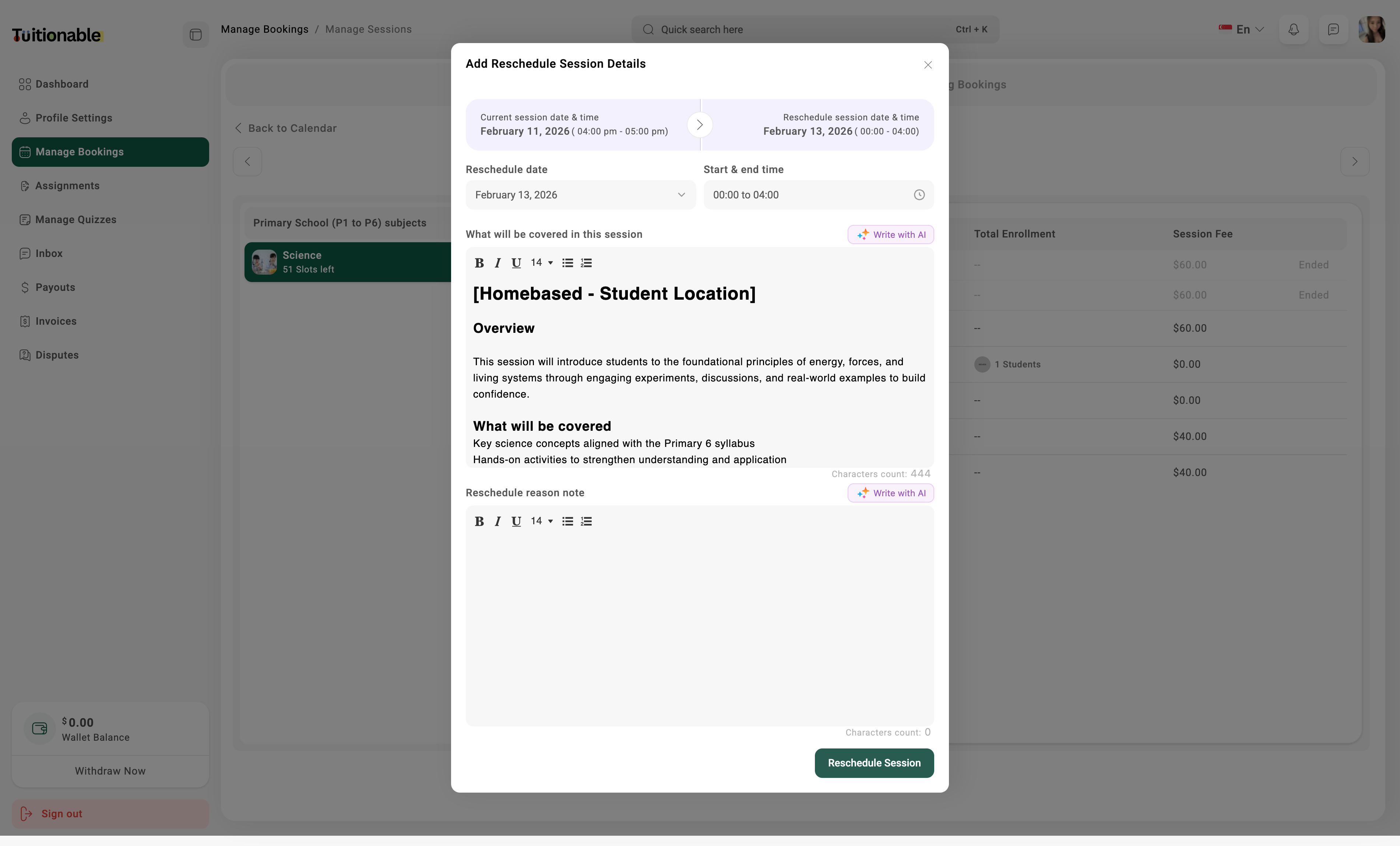
* Clicking **Reschedule to Other Day** will open the **Reschedule Session** modal.
* **Reschedule Date:** Choose a new date for the session.
* **Start & End Time:** Specify the new time.
* **Session Content:** Optionally edit the session description or objectives if required.
* **Reschedule Reason Note:** Provide a brief reason for the reschedule, ensuring transparency for the enrolled students.
* Once all details are updated, click **Reschedule Session**.
.jpg?fit=max&auto=format&n=SVFsNxfmTxnSCxtQ&q=85&s=98a7a7d546efdb042ca8e05864b7ad1b) The **Tutor Reschedule** tab will be shown on student calendar. When student click on Tutor reschedule, the **Reschedule Session** page will appear.
The **Tutor Reschedule** tab will be shown on student calendar. When student click on Tutor reschedule, the **Reschedule Session** page will appear.
 **Need help?** Speak to our [live chat](https://go.crisp.chat/chat/embed/?website_id=4d0db260-3c95-4794-9aad-48d6a5354a21) or join our telegram [community](https://mintlify.com/community).