> ## Documentation Index
> Fetch the complete documentation index at: https://docs.sg.tuitionable.com/llms.txt
> Use this file to discover all available pages before exploring further.
# Resume Highlights
The **Resume Highlights** section is where you can showcase your educational background, professional experience, certificates, and awards to enhance your profile.
### **Manage Education**
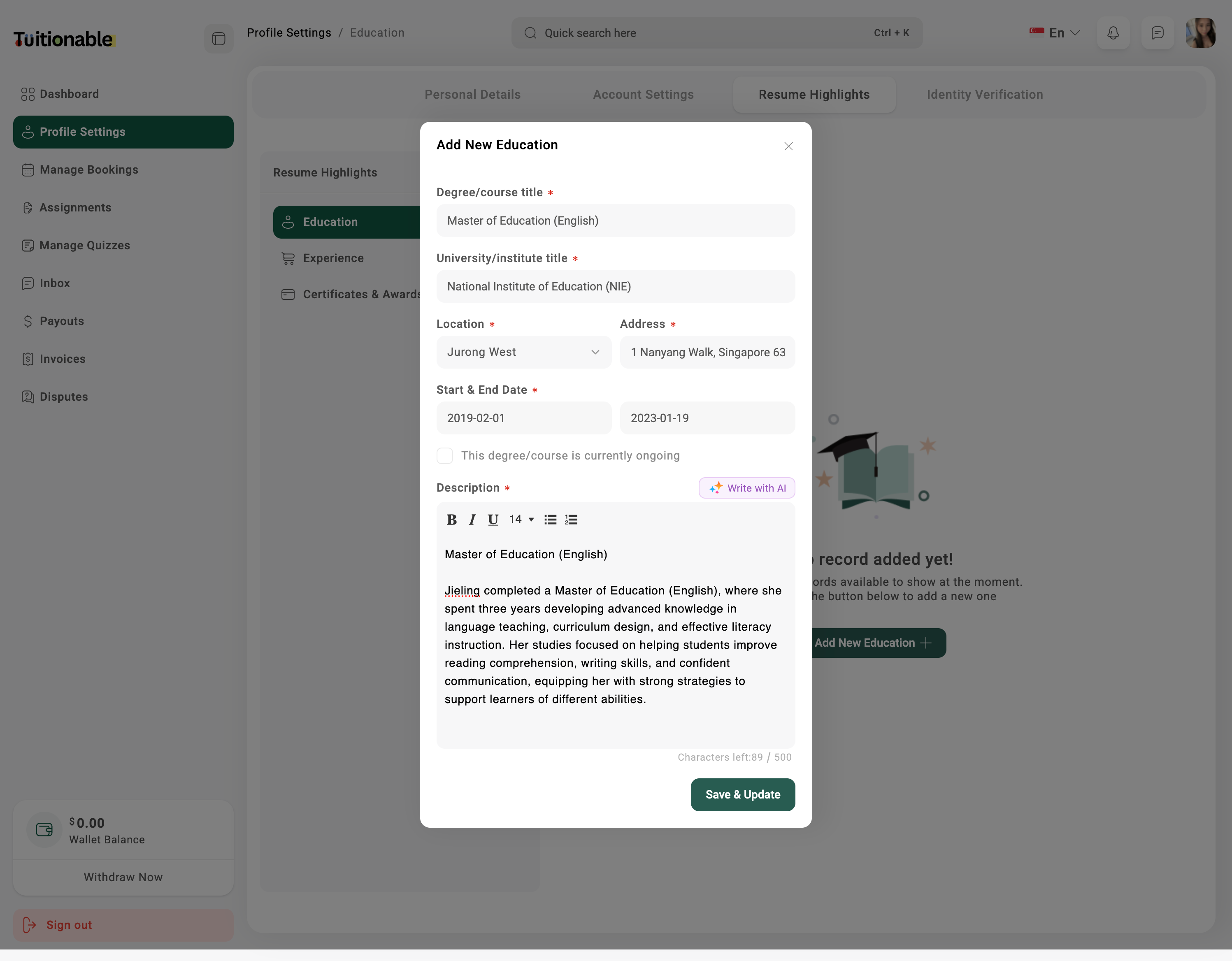
* Go to **Profile Settings** and select **Resume Highlights**.
* Click on the **Education** tab.
* Click **Add New** to enter your educational details like degree, institution, and graduation period.
* Click **Save & Update** to update your educational qualifications.
 ### **Manage Experience**
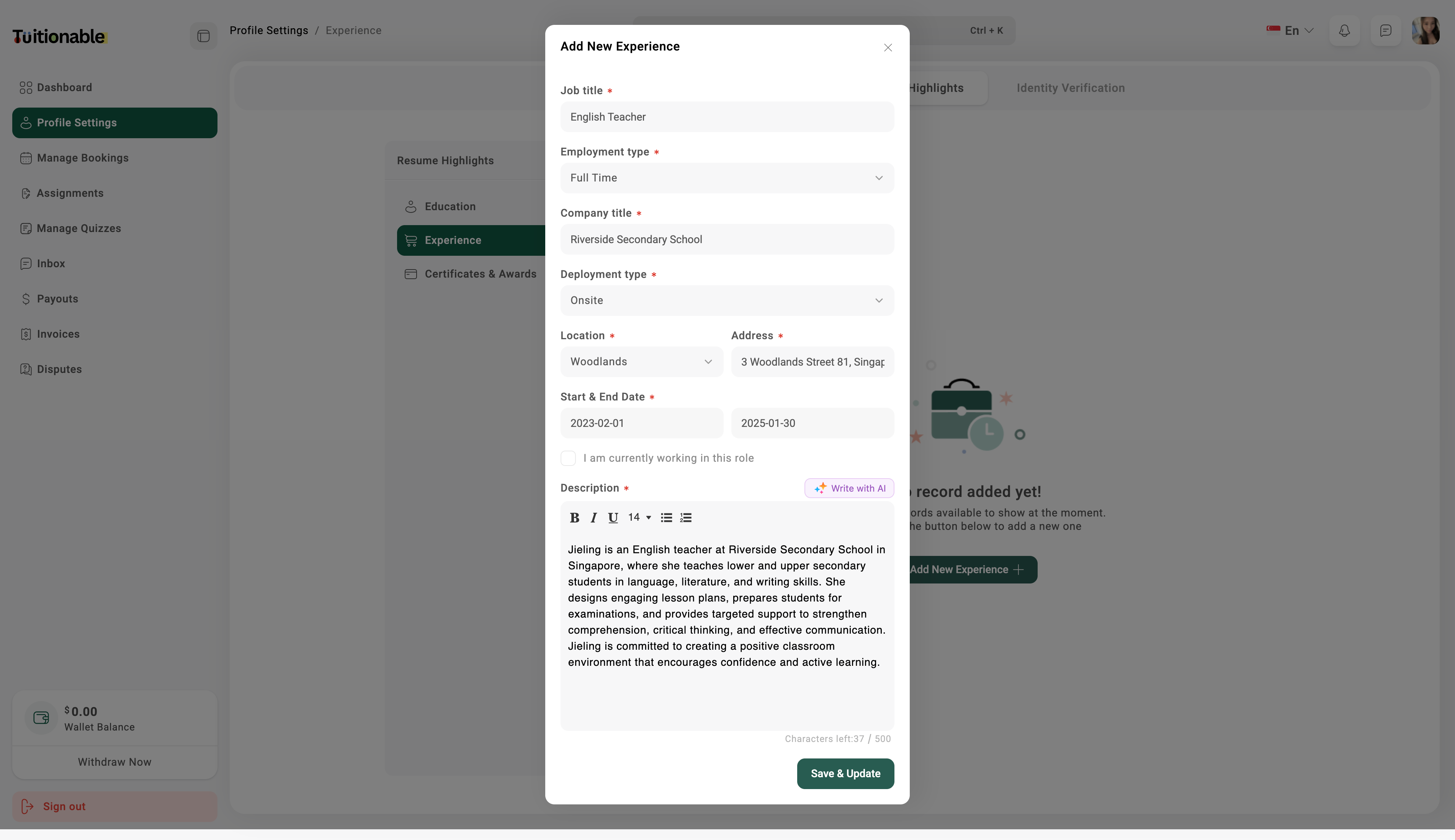
* In the **Resume Highlights** section, select the **Experience** tab.
* Click **Add New** to enter your professional experience details including job title, company name, and duration.
* Click **Save & Update** to update your experience.
### **Manage Experience**
* In the **Resume Highlights** section, select the **Experience** tab.
* Click **Add New** to enter your professional experience details including job title, company name, and duration.
* Click **Save & Update** to update your experience.
 ### **Manage Certificates & Awards**
* Under **Resume Highlights**, click on the **Certificates & Awards** tab.
* **Retrieve via Singpass Myinfo** or Click **Add New** to enter details about your certificates and awards.
* Upload OpenCert or any relevant documents or certifications, if necessary.
* Click **Save & Update** to update this section.
### **Manage Certificates & Awards**
* Under **Resume Highlights**, click on the **Certificates & Awards** tab.
* **Retrieve via Singpass Myinfo** or Click **Add New** to enter details about your certificates and awards.
* Upload OpenCert or any relevant documents or certifications, if necessary.
* Click **Save & Update** to update this section.
.png?fit=max&auto=format&n=gJPgCDgO9zelNd-_&q=85&s=f6a2417b0b0395d6025af20d0c218346) ### **Manage Academic Transcript**
* Under **Resume Highlights**, click on the **Academic Transcript** tab.
* **Retrieve via Singpass Myinfo** or Click **Add New** to enter details of your academic transcript credits, grade or level.
* Upload OpenCert or any relevant documents or certifications, if necessary.
* Click **Save Transcript** to update this section.
### **Manage Academic Transcript**
* Under **Resume Highlights**, click on the **Academic Transcript** tab.
* **Retrieve via Singpass Myinfo** or Click **Add New** to enter details of your academic transcript credits, grade or level.
* Upload OpenCert or any relevant documents or certifications, if necessary.
* Click **Save Transcript** to update this section.
.png?fit=max&auto=format&n=Ez_71zrHG6IbPDbR&q=85&s=c774aff18349ef64dabe517dd2fbc029) **Need help?** Speak to our [live chat](https://go.crisp.chat/chat/embed/?website_id=4d0db260-3c95-4794-9aad-48d6a5354a21) or join our telegram [community](https://mintlify.com/community).
**Need help?** Speak to our [live chat](https://go.crisp.chat/chat/embed/?website_id=4d0db260-3c95-4794-9aad-48d6a5354a21) or join our telegram [community](https://mintlify.com/community).